Define Work Packages
Work packages are a subdivision of a control account work scope, schedule, and budget. This is the level where work is planned, progress is measured, and earned value is claimed and calculated. Working from the top down in a work breakdown structure (WBS), control accounts are broken down into work packages or future work effort planning packages with assigned resource requirements. Work packages and planning packages are equivalent to tasks or activities in a network schedule with a defined start date, end date, and duration. Resources assigned to a work package are equivalent to resource loaded activities in a network schedule. The work package start and end dates determine the time frame for the value details.
When you have implemented the change control workflow process on your project, do not change your budget data in EVMax. This includes work packages, resource assignments, and time phased values. The change control process assumes you are using BOEMax to maintain a historical archive of the budget changes. All changes, including updates for rolling wave planning, are first modeled in BOEMax and once approved, the changes are merged into EVMax to maintain the budget data. The shared workflow functions ensure all changes to the baseline data are automatically documented using the source data in BOEMax and EVMax.
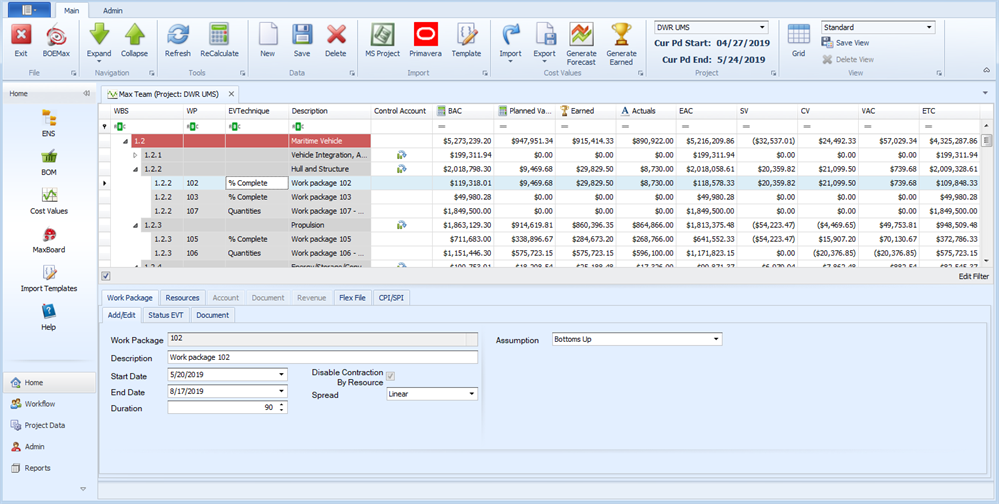
When you define a work package, select the:
- Assumption type. You have four options:
- Bottoms Up. This is the default assumption and is commonly used for labor resources estimated or planned in FTEs or hours. It also used for non labor resources estimated or planned in direct cost values.
- Parametric. When you select this assumption, you also select a defined parametric type. For this assumption type, recommend using BOEMax to enter your labor resource hours because BOEMax provides a Parametric Calculation window that isn't available in MaxTeam or EVMax. To use the Parametric option, you will need to add parametric types to match your business environment and import the historical parametric data into BOEMax. See Parametric Types. All ProjStream software tools and projects share the defined parametric types.
- Material. Use this option when you have defined one or more bills of material (BOMs) for the project. See Bill of Material (BOM). You use the Resource BOM window to select the applicable materials for the work package. The BOM identifies the work elements where the materials are assigned.
- Travel. For this assumption type, recommend using BOEMax because it provides a Travel Form for you to enter details about the travel costs that isn't available in MaxTeam or EVMax. Otherwise, you can enter a direct cost base result in MaxTeam or EVMax for the travel costs.
- Spread or distribution profile for the assigned resource FTEs, hours, or direct cost total values. The typical default is a linear spread.
- EV Technique. The default earned value technique is percent complete.
As an option, you can enter documentation text for the work package.
 Implementation Tips
- For the Bottoms Up Assumption type, consider defining separate work packages based on the element of cost category (labor, material, other direct cost, or subcontract) for the resources you intend to assign to the work package. That way you can assign a suitable earned value technique that reflects how you estimated or planned the work and the base result. At a minimum, consider defining separate labor and non labor work packages. Labor resources are typically estimated or planned in FTEs or hours. Non labor resources are estimated or planned in direct cost values.
- Selecting an earned value technique for the work package is optional during the proposal phase of a project. This setting is used during the execution phase of project and may be imported from a schedule tool. You may want to select a default earned value technique for discrete effort work packages and select the level of effort technique for support work packages such as project management. For work packages assigned the Material assumption type, recommend selecting the Quantities or Earning Rules earned value technique for use during the execution phase depending on how you have built out your data in the project's bills of material (BOM). You can also identify a work package as a planning package when there isn't enough information about the work scope to create a discrete effort work package. You still need to identify at least one resource for the planning package and assign likely resource requirements.
- Determine if you need to add user defined codes or fields to the work packages. Define these attributes before you start creating the work packages. Adding a code or field later means you will need to go back and enter the data for the work packages you have already created.
What do you want to do?
- Add Project User Fields. For the dropdown, select .
- Add WBS Planning Packages for future work effort. Summary level planning packages are often used for rolling wave planning.
- Add a Work Package. Includes use notes for creating control account level planning packages.
- Edit a Work Package. Includes use notes for converting a planning package to a work package with an assigned earned value technique.
- Delete a Work Package
- Add Project Standard Documents. For the dropdown, select .
- Enter or Edit Documentation for the work package.
Main EVMax Window, Work Package Tab
Standard View, Example Bottoms Up Assumption
What to Do Next
- Assign Resources to the work packages.
- Enter labor FTEs/hours or non labor direct cost base result values for the assigned resources in the applicable calendar month or time phase the values within the work package start and end dates. See Enter Base Values.